-
input태그의 type에 따른 객체 선택jQuery 2020. 12. 23. 18:39
다양한 type의 input 태그 선언
ex.
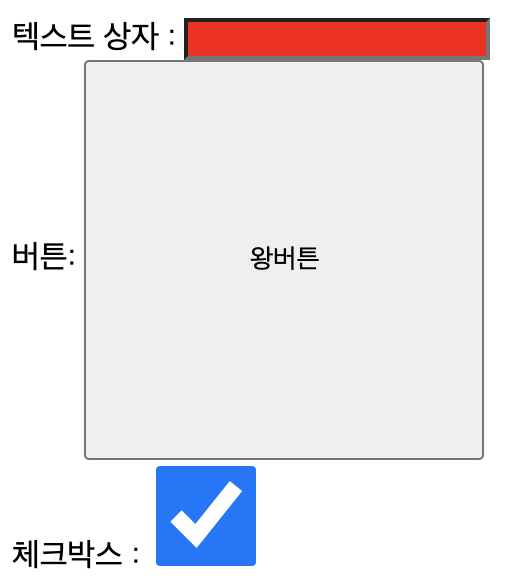
<label>텍스트 상자 : </label>
<input type="text"><br>
<label>버튼: </label>
<input type="button" value="버튼"><br>
<label>체크박스 : </label>
<input type="checkbox"><br>
<label>이미지 : </label>
<input type="image" src="image/flower1.PNG"><br>
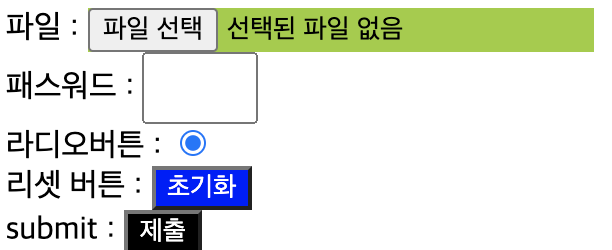
<label>파일 : </label>
<input type="file"><br>
<label>패스워드 : </label>
<input type="password"><br>
<label>라디오버튼 : </label>
<input type="radio"><br>
<label>리셋 버튼 : </label>
<input type="reset"><br>
<label>submit : </label>
<input type="submit"><br>
<script>
$(document).ready(function(){
text의 배경색 변경
$("input:text").css("background","red");
button의 value값, 크기 변경
$("input:button").attr("value","왕버튼").css({"width":"200px","height":"200px"});
checkbox의 크기 변경 및 속성 checked
$("input:checkbox").attr("checked", true).css({"width":"50px","height":"50px"});
image에 이벤트 생성
mouseenter() : 마우스가 요소 경계 내부로 들어왔을 때 이벤트 발생
이벤트 안에 일어날 함수 작성
이벤트 안에서의 this -> 이벤트가 일어나는 대상
$("input:image").mouseenter(function(){
$(this).attr("src","image/river1.PNG");
});
mouseleave() : 마우스가 요소 경계 외부로 나갔을 때 이벤트 발생
$("input:image").mouseleave(function(){
$(this).attr("src","image/flower1.PNG");
});
file 배경색 변경
$("input:file").css("background","yellowgreen");
password 가로세로 크기 변경
$("input:password").css({"width":"50px","height":"30px"});
radio 속성 checked
$("input:radio").attr("checked",true);
reset button 배경색/글씨 색상 변경
$("input:reset").css({"backgroundColor":"blue","color":"white"});
submit button 배경색/색상 변경
$("input:submit").css({"backgroundColor":"black","color":"white"});
});
</script>
결과

image에 mouseenter()이용해 경로 속성 설정 
image에 mouseleave()메소드 이용해 경로 속성 설정 -> 이미지에 마우스커서를 갖다댈 때 벚꽃 사진,
마우스 커서를 뗐을 때 강 사진 나타남
'jQuery' 카테고리의 다른 글
순서에 따른 필터 선택자(first,last,even,odd) (0) 2020.12.23 input 태그의 활성화,비활성화 상태에 따른 선택 (0) 2020.12.23 select > option 태그의 상태에 대한 선택(drop down list) (0) 2020.12.23 checkbox의 상태에 대한 선택 (0) 2020.12.23 jQuery 개요 (0) 2020.12.23